Sunday, July 31, 2016

Sports Shop Maintenance software

Multiple sporting goods sold out in one place. Some are sports equipment, sportswear, exercise, fitness, athletic, etc. If using any software for reduce working processes of shopkeepers. Let us discuss how Apptivo management software adapts to sports shops.


Inventory Management and tracking process

Plenty of sports goods are there for sale so you can manage all goods using inventory app. To store all goods with their name, quantity, price, tax code. If product move on to sales then automatically items counts decrease in the inventory. This app allows you to track all product with update status.
sports shop items.png

How to manage all your customer without any confusion?

Many customers visit your shop for buying sports goods. If you maintain proper records of your customers, it helps to improve your business and promote your new products in upcoming days. Through customer management apps to store all customer contact details, address, social information.
SPORTS HOP CUSTOMERS.png

Generate invoice/billing for product

Customer purchase many products after you provide invoices for your product. Using invoices apps to create the invoices with multiples of product categories.
sports shop orders.png
sports shop invoices.png

Promotional application

Suppose you organize any sports events or activity. It definitely needs some promotion, so using our marketing apps to promote your events to many target audiences.
sports shop marketing.png

Conclusion

Above all Apptivo application assists to manage your sports store business process. Nothing is impossible in the business so improve your business growth and customer retention.   


Sunday, June 26, 2016

Assign Roles for Employees

In an organization, many employees are works in a different department so need to assign multiples security roles. This for only security purposes, Apptivo allows you to set roles for employees who all are work under the project, handle confidential,etc. We set roles access then a person has access they only allow to enter and access the data or anything. How to set roles for employees using Apptivo software.

Roles

First you have to create multiples roles in the employee's application. It available in setting then click Roles to create many roles based on your choice. For example View access, edit access, delete access, access contacts, access invoice, access timesheets, etc. Apptivo allows you to create the multiples of roles it all are assigned to different application like CRM, Financial, Project Management, etc. Purpose of roles is employees works under projects they won’t need to see sales process if roles not assigned to employees they view every application suppose assign roles to employees they view only allocate application. This role for security purposes and also reduces employees confusion, employees view every application details it confuse the employees. Create roles and assign to employees in that roles set a employee's needed apps.
add-roles.png

Privileges

Privileges are single access like employees only view, edit, create, manage, etc. Create multiple privileges then include newly created privileges into roles. Assign particular Roles to employees, if you want to remove some privileges in roles already assigned to employees. Edit roles after assigning to employees.
Create-View-Privilege.png
privileges.png
remove-role.png


Conclusion

An organization applies more security to data based on your business needs or your choice. Because works with more security both internal and external it reduces data loss, attacks in online and secure from more issues.


Thursday, June 23, 2016

Customization Application

Customize CRM Applications
Apptivo provides CRM applications to manage customers, keep records, tracking each and every activity. Different business fields having various set of process so based on business types you can customize Apptivo software. This software allows you to customize the applications based on your business. Let’s see about how to customize the Apptivo CRM Applications.
Customization
CRM application contains leads, customers, contacts, opportunities, and cases. Creating any customer details in the customers application. It contains many details like personal information, contact information, and address information etc. If you want to customize the customer creation page to easily design your own creation page just drag and drop all fields.
master.png


Master Layout

Using this master layout options to design creation page in CRM application based on your business requirements. In this master layout, many attributes are available on the right side of the application. Easily drag and drag needed attributes after completion of customization it reflected in your creation page.
master layout.png

List Layout

List layout allows you to customize the contacts of customers information. After creating customers details it shown in overview page, choose fields which are shown in overview page, social media information and business information.
List-Layout.png

Views

Views for fields displayed in the left navigation panel, configure your own needed option click Toggle ON or OFF based on your needs, it reflected on the homepage of the application.
Views-Customization.png


Conclusion

Customers like to work on their style or based on business needs. So they like to work with the customizing application.


Friday, April 29, 2016

Human Resources Software Is Not A Strange Technology, Apptivo Has Brought In New Trends


Software implementation in an organization is not just paperless working environment, but it needs to be something extraordinary with latest trends like office analytics, employee workflow and performance visualization. It in turn helps to increase the employee productivity and have a track on the work.

Instead of providing different system for employee management, holiday management, team and recruitment, integration brings multiple applications together. You need to be clear to upgrade all the information it helps you to be well organized as well informative on all your employee details from joining  to retiring date.

Move your documents of your employee: Human Resources Management software projects are designed to simplify your work to increase productivity. You may register the employee details with an employee ID and allocating the department to work, doesn’t ends up but also providing the employee resume documentation. Manage you to view the details in an alphabetical order using directory option.


Track or shift the employee to another department: Department App dashboard allow you to view your employee department wise in an alphabetical order. If required shift the employee from one department to another.


Organize customer business or holiday trip: Holiday App helps you to note your holiday with date & type mention it as vacation or  business trip. If any changes required either edit or delete your trip. As integration allows you to calculate the holiday  attendance and pay based on it.


Register your candidate details: Collecting and registering entire employee education history doesn’t ends up. You can also review & register the candidate status as waiting list, scheduled or rejected.You can also view the candidate as per the industry with candidate number, name, phone number and e-mail I.D.Also allow you to view he action performed on each candidate.


Improve the quality of recruitment:  Allows to reach on more candidates helps you to filter as per the company needs. Provides you to manage all the contact list using contact management.  E-mail the candidate after the interview using Email also track all the conversation of the candidate.Track & view interview events and dates using calendar.


Know your team work: Striving to reach the goal as a team work, at the same time track who & what is being done, actions performed are needed to be identified. Teamwork App provides you a detailed description whether the team has completed the task in time.

If you are sure that the data is updated in time effectively.It reduces overlapping or unnecessary repetition, by providing accurate information.Allow you to measure the employee performances make you to work as a great human resource executive.


Monday, April 18, 2016

Report To Your Manager Use Timesheets Track Your Data


We spend enough time at work, the time spent on work needs some actions like reporting. Even though all our tasks are completed in time why do you need to have a Time sheet?It not only analyze your performance but also aids in your promotion. It trains the employee to act in accordance with rules. In Apptivo the Time Sheet is integrated with all the other Apps.

Key Benefits Of Using Time Sheet:

Allow you to speak employee activity:It displays all activities. Also allow you to view the activities of employee in Time sheet News Feed.

Approve your completed work: You can send the work done to the manager for his approval by submitting the sheet. If any other modification requires, you can re-modify and resubmit it.

Record it for future reference: Notes can be added in Time sheet as an explanatory or provide critical comment.

Facilitate to support your business: As it is integrated it supports to share the business thoughts with all the other Apps.

Approach with permission: You can control the access based on the role it needs to play.

Generate Time sheet from projects: Timesheets are generated from the existing project or by creating new project.

Bill your time spent: Time sheet when approved is converted into invoice with customer name.

Work log duration: We can create Time sheet with the start and end date my mentioning the customer name mention the task & hours spent on it. It accumulates the total number of hours spent on each project. Make this project billable or non-billable.

Dashboard informs us all the activity of the employee with the status in hours, along with the time spent.Once the project is completed, we need to report to organization or customer on the hours spent on each projects by mentioning the different stages of work process. When approved, create invoice based on the work done, which could be hourly or minute based.

Having all this in workplace make you to work efficiently, allow you to view & allocate the time spent and will help you to manage your time. At the end of a day, you would know how you had managed your business. All you have to do is use Time sheet for your career.

Friday, April 15, 2016

How To Manage Web Design Company Projects?

Managing all the web designing projects of the company is interesting, all web designers perform the job best, they generally love their jobs and they are much passionate about their work.But risk arises when the work is not scheduled probably, manager fails to follow up on the task performed. An interesting job can become shabby if not scheduled properly.

When i was working as a team leader after scheduling the task to 20 staffs . At times i fail to follow- up on the task. When it needs to be implemented then it takes time due to modification or in-completion of  these task.In this field for the past 10 years, i was in search of solutions. Technology showed it’s way.

Installing new technology was my thought, we installed a software to manage all the projects.My staffs were curious, i trained my staffs they  followed the steps. But there question was why is it needed? I explained them few points.

Allows you to track the workflow
Streamline all your activities
Helps you to communicate effectively
Create invoice based on the work.
Also enable us to perform better.

With all this in mind, we started using the software by inputting all customer details.
Initially so much of mistakes, step by step with help of customer service. We started to plan as a team to install Apptivo software. We discussed on the Apps involved:

Manage All Information:

Customer Relationship Management App is integrated with all the other Apps such as inventory, financial and with google allows you to synchronize all customer details easily.

Key Benefits of each App:

Customers App: Manages all customer account details.
Leads App: This App helps you in the sales were all contact information are stored.
Contacts App: Some leads are converted to contact if you are satisfied.
Opportunities App: It provides you to bring in close deals, it helps to track sales.
Cases App: Allows you to notify  all the issues of the customer.

Project Planning Tools:

Project Management App help you to organize and manage your work easily. It allows you to perform your business a better way.Tools which helps you to manage the projects are:

Key benefits:

Templates: Create unlimited templates for the projects also launch new projects.
Manage tasks: It helps to schedule & complete the task and calculate the schedule automatically.
Billing: It allows you to create bill based on the time spent on the projects.
Track your time: Allows you to know the time spent on the projects.

Documentation

It is important to store documents and presentations. Document App helps you to store data in folders it is where you can allocate sub folders and also share the work with other employees.

Key benefits:

Choose the file: It’s where you select & add your document from the computer or Google drive. Also upload the documents store in online.
Integration: Always know that the software is integrated, download the documents from Google Apps by making sure that you had logged into Gmail.

We implemented the software, few months past when all my web projects were delivered in time. I was praised by my customers. Team effort works better. It’s that my dreams came true.


Wednesday, April 13, 2016

Implementing Employee App For Business Solutions


Employee a key performer in organization, play an key role to achieve organization mission and vision. Make sure that a system is in place to uplift the productivity. The system which is place should not only save money but also save time.

Innovate new things in workplace by training and educating subordinates a better way.The same methodology touched my workplace, installed Apptivo software. A software which changed, developed and improved my business style.It was extremely difficult to take decision on employee performance. Apptivo enhanced my business differently.

What is an employee App? How does it plays its role?
Software which not only maintains all employee details but also allows you to allocate work and also enable us to review on the specified work.So its key role is reviewing also know the employee performance visibility.

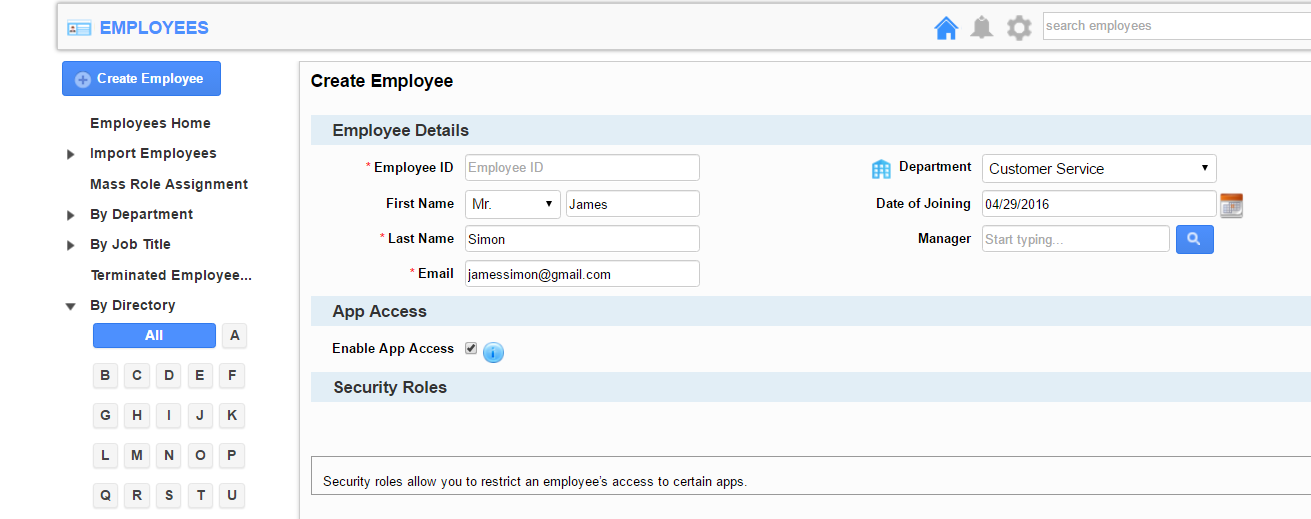
Manage Employee Data: Allows you to create database of your employee with all personal details by creating a employee ID. Collect all employee database from Google to Apptivo, enable login to selected employee.

Assign The Role :Assign a role in your business to the employee by selecting the specified category. It allows you to view the role assigned to each employee which in turn helps you in constant follow up.

View The List As You Wish: View the employee list based on the job profile, directory in alphabetical order also based on the location.

Integration: All the Apps are integrated with Employees App it helps you to share the data of all the other Apps.

Manage All Activities: All added privileges in the App, allow you to add a terminated employee to a new employee. You could store the documents and manage all the task, Appointments, calendar,call log and e-mails.

Key Benefits Of The App: It is easy to use, tracks the work status, allow you to view complete employee profile, being scaled, view the performance, eliminate paperwork and increase productivity with cost savings.

We think twice when we invest on human capital which is high, why not on a software which could achieve organizational objectives and Goals.