Thursday, August 18, 2016

How to setup Business Branding with Apptivo

Email service providers allow their customers to sending mail from one person to another, documents sharing, attachments, include business brands and more features. These all are normally available in the every mail service. Now we see about how business brands include with the help of Apptivo.

Business Brand

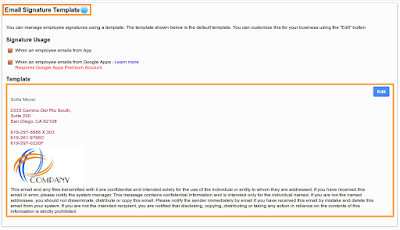
Nowadays business peoples mostly insert their business brands with sending mail to clients or stakeholders or any business purposes. This features now available in the Apptivo. Through mail you can add own business brands, it shows contact information to your recipients. This feature tells of your business brands to customers, and receivers easily understand this mail is sent from authorized people.
Email signature

Conclusion
Due to increasing of spam mail, business brands features include in the business software helps to receivers fully satisfy and they don’t consider authorized business brand include mail as spam.  

Wednesday, August 17, 2016

Inventory Management

Best, Affordable and Integrated Inventory Management Software
Basically, inventory management assists to keep track of all products details, maintain up to date records, stock maintenance. But apart from these many things available on different software. If more stuff is there in a single portal, everyone thinks its cost is high but is wrong. This software cost is comparatively cheap in the marketplace. Let us show you something about this software.

Manage Inventory

Apptivo Inventory software provide plenty of services to customers for easily handle bulk of stock in a single platform.

Product Details

Items application helps to store plenty of products with complete information. Also add multiples of categories that depends on product you want to manage.

Items Transactions

Item Inventory for transfer products from one warehouse to another warehouse. It needs some information about warehouses like from and to details then fill fields for how many items need to transfer.

Purchase Order

If orders are made for customers that counts automatically reduced in the total quantity. Suppose above order products available less count in the inventory it automatically show the messages.


Integration

Apptivo Inventory management software integrates with CRM, Supplier Invoices, Estimates, etc. So easily handle your customer and also generate invoices based on product/Items.


Conclusion

This type of more integrated application is suitable for complete bulk of tasks more effectively in a less time and affordable in cost.  


Tuesday, August 9, 2016

Startup Company

How startup nurturing with help of Business software?
Initial stages of all large-scale industry or organization is startup. So every big thing starts small that is science and it applied to business also. After launch of startup we must put our efforts for develop the company. Some of the important medium requires to boost up the startup productivity, improve revenues and company growth & standards. How to do that above all without spends more investment and done very easily. We have to follow make it simple techniques that are.

Technology for startup company

Today's technology development increased rapidly so suitable software helps to startup growth. There are plenty of business software vendors available in outside, now we see about one of the software's that suitable for startup company.

Promotional activity

If company product already reached to many customer and audiences it’s not a problem. Suppose products needs more promotions, you can access the marketing tool to send campaigns to many audiences. It helps to reach out company product/services to many audiences.

CRM (Customer Relationship Management)

Any fields of company, customer satisfaction is one of the sources for success. So manage all customers, handle all leads information, track all your salesperson activity and analysis reports through CRM software.

Financial Management

Next important for startup company is finance. At startup stages accounts maintenance is little bit tough so pre-defined templates for invoices/billing, generate it based on your business norms, keep record of all payments and company expenses in Accounting software(Invoices, Expenses, ledger, etc.)

Conclusion

Above all software available in a single platform, Apptivo. Using this technology to improve your business growth and change the name of startup company into medium scale or large scale company.


Sunday, August 7, 2016

Small Business

What reasons for small business fails?
Every year plenty of entrepreneurs come out with huge dreams to start their own business. Due to some reasons most of them are failed in small business. Let us start the discussion in which places they missed good opportunity and how to overcome this situations with using Apptivo.

Crucial point out of fails
Business Ideas
Initially, any type of business fields it surely needs ideas then only taking your innovative ideas into next level planning. 2016-08-06 11_13_26-Business fails.xml - draw.io.png
For example: If you are willing in products sales business, start to collect all information about this field, marketing trends, competitors, analyse everything about it. Then think new innovative ideas to your business. In case fails in this stages most probably upcoming everything fails or sometimes it end up with positive results.


Planning
Next level is planning, already noticed in the above paragraphs ideas are the stepping sources to good planning. Before launch and after launch your small business you design more planning for upcoming days. That are    
Step by step planning for startup business
Business planning is very important, next failure reason is the lack of business planning. Most of them failed in this stage.


Management
After long efforts business launched, this is startup stages so manage all business process is a daunting task. Management process like customer relationship management, Accounting, and Marketing, it all are essential. Let's see one by one.


Customer relationship Management
Better customer relationship leads your business into success. All customers wants our services on time without any delay. If failed to provide services to customers in a right time customer satisfaction decreased then customer retention totally damage.


Customer management fails
Accounting
If the company is started up to date each and every accounts details maintenance helps to develop business. All financial transactions records help to easily take annual revenue reports, incoming and outgoing amounts records, etc. Many small businesses has lack of accounts management. In starting stages it runs normally after days going it creates many problems and causes for business close.
Accounts Management for small business


Marketing
Every small business needs some promotions activity to reach out business to many target audiences. Many small business owners lack in this area. We convey about our business to many audiences it helps to improve business growth. If promotional activity didn't proceed properly or not done. Surely, it also one reason for small business close.
Startup marketing activity
 
How to Overcome small business fails?
Technology implementation is essential for small business. That helps to manage all business process some are customer management, accounting, expenses, marketing and sales tracking. There are plenty of software vendors available and they instantly provide services. My suggestion is software with more integration, fully customization, ideal to use. It helps to manage your small business without fails.


Conclusion
Failure is the stepping stone to success don’t lose your confidence. Every failure teaches some lessons keep that in mind. Achievement available in front of you but we put more efforts and most are Ideas, Planning and technology selection.


Sunday, July 31, 2016

Sports Shop Maintenance software

Multiple sporting goods sold out in one place. Some are sports equipment, sportswear, exercise, fitness, athletic, etc. If using any software for reduce working processes of shopkeepers. Let us discuss how Apptivo management software adapts to sports shops.


Inventory Management and tracking process

Plenty of sports goods are there for sale so you can manage all goods using inventory app. To store all goods with their name, quantity, price, tax code. If product move on to sales then automatically items counts decrease in the inventory. This app allows you to track all product with update status.
sports shop items.png

How to manage all your customer without any confusion?

Many customers visit your shop for buying sports goods. If you maintain proper records of your customers, it helps to improve your business and promote your new products in upcoming days. Through customer management apps to store all customer contact details, address, social information.
SPORTS HOP CUSTOMERS.png

Generate invoice/billing for product

Customer purchase many products after you provide invoices for your product. Using invoices apps to create the invoices with multiples of product categories.
sports shop orders.png
sports shop invoices.png

Promotional application

Suppose you organize any sports events or activity. It definitely needs some promotion, so using our marketing apps to promote your events to many target audiences.
sports shop marketing.png

Conclusion

Above all Apptivo application assists to manage your sports store business process. Nothing is impossible in the business so improve your business growth and customer retention.   


Sunday, June 26, 2016

Assign Roles for Employees

In an organization, many employees are works in a different department so need to assign multiples security roles. This for only security purposes, Apptivo allows you to set roles for employees who all are work under the project, handle confidential,etc. We set roles access then a person has access they only allow to enter and access the data or anything. How to set roles for employees using Apptivo software.

Roles

First you have to create multiples roles in the employee's application. It available in setting then click Roles to create many roles based on your choice. For example View access, edit access, delete access, access contacts, access invoice, access timesheets, etc. Apptivo allows you to create the multiples of roles it all are assigned to different application like CRM, Financial, Project Management, etc. Purpose of roles is employees works under projects they won’t need to see sales process if roles not assigned to employees they view every application suppose assign roles to employees they view only allocate application. This role for security purposes and also reduces employees confusion, employees view every application details it confuse the employees. Create roles and assign to employees in that roles set a employee's needed apps.
add-roles.png

Privileges

Privileges are single access like employees only view, edit, create, manage, etc. Create multiple privileges then include newly created privileges into roles. Assign particular Roles to employees, if you want to remove some privileges in roles already assigned to employees. Edit roles after assigning to employees.
Create-View-Privilege.png
privileges.png
remove-role.png


Conclusion

An organization applies more security to data based on your business needs or your choice. Because works with more security both internal and external it reduces data loss, attacks in online and secure from more issues.


Thursday, June 23, 2016

Customization Application

Customize CRM Applications
Apptivo provides CRM applications to manage customers, keep records, tracking each and every activity. Different business fields having various set of process so based on business types you can customize Apptivo software. This software allows you to customize the applications based on your business. Let’s see about how to customize the Apptivo CRM Applications.
Customization
CRM application contains leads, customers, contacts, opportunities, and cases. Creating any customer details in the customers application. It contains many details like personal information, contact information, and address information etc. If you want to customize the customer creation page to easily design your own creation page just drag and drop all fields.
master.png


Master Layout

Using this master layout options to design creation page in CRM application based on your business requirements. In this master layout, many attributes are available on the right side of the application. Easily drag and drag needed attributes after completion of customization it reflected in your creation page.
master layout.png

List Layout

List layout allows you to customize the contacts of customers information. After creating customers details it shown in overview page, choose fields which are shown in overview page, social media information and business information.
List-Layout.png

Views

Views for fields displayed in the left navigation panel, configure your own needed option click Toggle ON or OFF based on your needs, it reflected on the homepage of the application.
Views-Customization.png


Conclusion

Customers like to work on their style or based on business needs. So they like to work with the customizing application.